Wednesday, October 21, 2009

Windows 7 Cometh


Windows 7 is going to be available to the public starting tomorrow. Before you run out and install it on your favorite business computer, give us a call. There are some checklists that we would love to run you through to be 100% sure that you wont shut your business down for the day. :)


In all seriousness, I think it's going to be a great new version of Windows. The reviews are positive in the press, and i've been running it with some great success for about 2 months on my laptop. Not only is it faster than Vista, it's more stable too.


If your new computer comes with Windows 7, and you need some help getting over the initial learning curve, just give Hughes I.T. a call. And DONT FORGET, if you purchased a computer within the last month, you will most likely be eligable for a free upgrade from Vista to 7, so look for that information from the manufacturer of the computer.


Thanks again for stopping by!

Dave Nevill
Hughes I.T. Solutions Inc.
407-284-1192


Also, if you're a stressed out small business owner who just cant stay motivated, you need to talk to Jenn Edden. She runs an amazing business coaching program that teaches you how to deal with the stresses of business and life while you get focused and in control. She's done wonders for alot of people and I know she can help you. Check out Jenn Edden Coaching to learn more.

Tuesday, October 20, 2009

Windows Desktop Clutter Solved, Thanks to Your Favorite Web Designer!

Hey Gang!

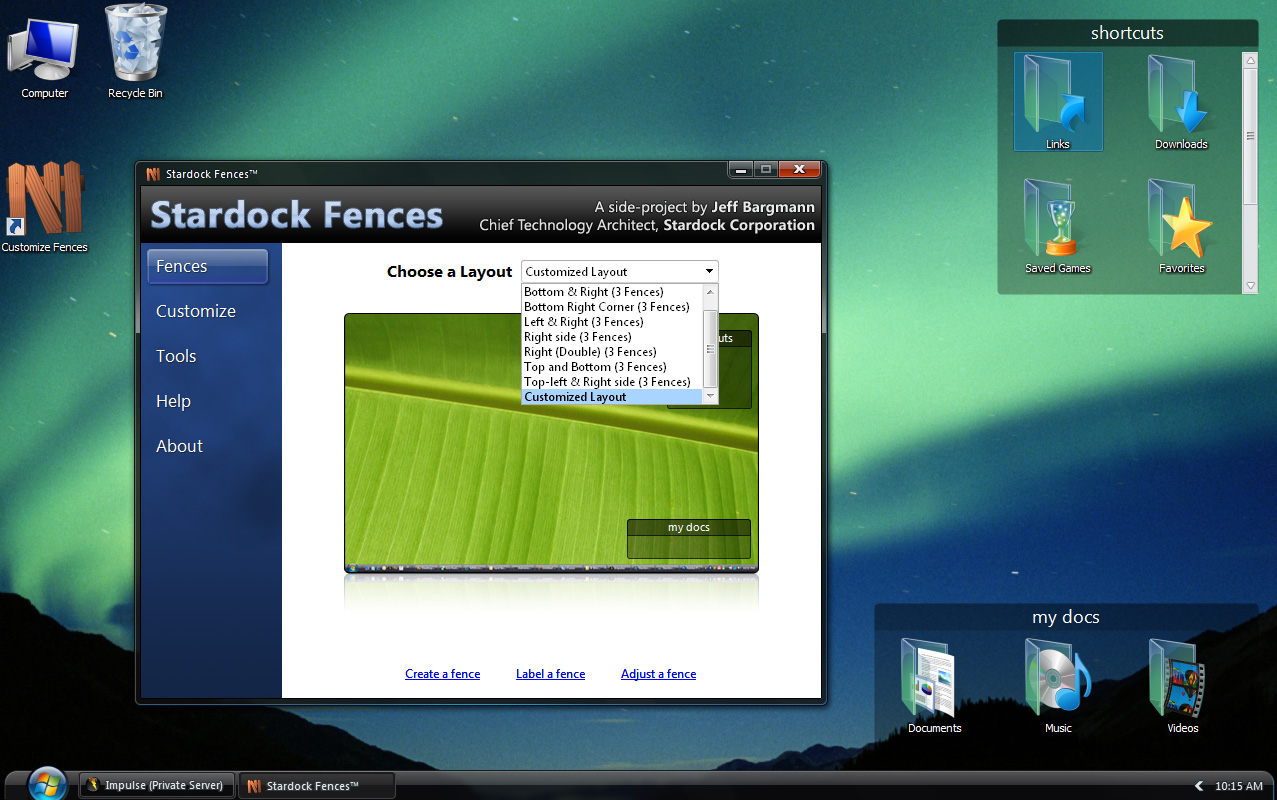
Thanks for stopping back by. I have spent the better part of the last hour or so testing out a really amazing program for people like me. It took my cluttered up desktop and literaly transformed it into a managable and pleasant place to be. All my icons are nicely arranged into groups, and if I dont feel like staring at them, it's just a double click away.

Not wanting to write a whole book about the program however, I decided to take the following from my favorite site for software, http://www.download.com/. So head on over to their site to learn more about this program, and download it for yourself. IT"S FREE :)

The following is courtesy of Download.com

If you're losing the battle over your workspace to your desktop icons, a secret weapon is one click away. Fences quickly and easily organizes your icons into separate windows on your desktop, either automatically or manually. Labeling these boxes helps keep programs, photos, files, and Web links together, or you might choose to group by project rather than by file type. Whatever your logic, you'll be able to drag and drop fences (and the shortcuts within them) anywhere on your desktop.

You can furthermore drag and drop shortcuts anywhere, and resize the fence. A scroll bar pops up so you can find your icons in fences that you've resized to be smaller than their contents. In addition to sorting shortcuts, you can cleverly hide them completely by double-tapping the desktop; double-tapping again resurfaces them. Fences helpfully lets you exclude select fences from hiding. Customization tools can change the color scheme or take snapshots of your layout at any time, in case you'd like to switch among them without completely redoing your arrangement.

We just wish that creating a new fence was smoother and took fewer steps, and that you could create rules for certain files types to automatically download into specific fences. Perhaps we'll see that in a future premium version. In the meantime, we recommend Fences to anyone looking for a fast, fresh solution to persistent desktop clutter.

And dont forget, if you need a great website, and you're anywhere in the world, just give us a call.

Tuesday, September 22, 2009

Facebook Scams and Other Issues You Need To Know About


This article is from Switched.com, so I hope they dont mind. The information is extremely valueable to anyone who uses Facebook, even casually.
by Terrence O'Brien (RSS feed) — Sep 15th 2009 at 1:31PM - Switched.com

Just as bearded hipsters migrate from bar to bar in pursuit of young ladies to ogle, so too have scammers and hackers followed their prey from MySpace to Facebook. As a result, the social network once deemed the "safe" option is now plagued by legions of 419 scammers, phishers, and peddlers of malware. Fortunately, there are a few simple rules Facebookers can follow to stay safe: Never click on suspicious links from friends; use a service like LongURL before following any shortened links; and assume that anyone begging for money is up to no good. And if you do happen to fall victim to a scam, quickly alert your friends (to prevent spreading the damage), then alert Facebook administrators and, if it's serious, law enforcement as well. Since a reputable source once counseled that knowing is half the battle, here's a rundown of the Facebook scams most demanding of your awareness and good judgment:

1) The friendly 419 scam:
The notorious 419 scams have sadly become ubiquitous on the Internet. While they began as e-mail cons, usually involving promises of a vast fortune from a Nigerian prince, they have morphed into a new and more sophisticated ploy that involves hijacking the Facebook account of a friend in order to fool kind souls into thinking they're helping a pal. Thieves use an account to garner sympathy as they claim to be in desperate need of cash, often because they've been robbed or detained while traveling abroad. One duped Missouri woman wound up handing over $4,000 before she realized she'd been had.

2) Hidden fee apps:
There are plenty of Facebook apps and quizzes with questionable motives and privacy policies, but there are some that are outright scams. Take, for instance, the sad tale of Leanne Saylor, who fell prey to scammers after taking a simple IQ quiz on the service. To receive her results, she was required to submit her cell phone number and wait for a text. When she didn't receive anything, Saylor entered her phone number two more times. When she opened her next cell phone bill, she discovered three charges from the app, totaling a whopping $44. AT&T blocked future fees, but Saylor learned the hard way that she should never give out her cell phone number to strangers, much less strange apps.

3) Fake login pages:
A particularly sneaky method of ensnaring Facebookers lies in the loads of phishing messages that lead to convincing-but-fake versions of the Facebook login page. Typically, these spam e-mails are brief and contain a link, usually ending in ".im" or ".at." (We received one that simply read, "Look at goodmall.be.") Once you enter your e-mail and password to 'log in,' it's game over; a hacker has control of your account and will quickly use it to perpetrate any one of the scams listed here. What's worse, they'll impersonate you to spread phishing e-mails to all of your friends.
Once an account is hijacked, it can be used to deluge that account holder's friends with messages containing links to malicious sites. It's rough stuff. These poisonous software packages leave you vulnerable to the theft of even more data, including all the passwords, account numbers and credit card information you may have entered into your PC. Recently, a barrage of spam messages featuring a link to "CoooooL Video" actually led to nothing but a nasty malware infection. If you have experience a malware infection, and live in the Central Florida (Orlando) area, call Hughes I.T. Solutions today to get it removed.

Creating Facebook applications has become so easy that hackers have created apps with the sole aim of tricking you into handing over your personal data or Facebook password. Some versions impersonate one of the standard Facebook features, like "Your Photos" and "Friend's Gifts," and send convincing notifications, like "someone has commented on your photo," or so-and-so "has posted on your wall." But clicking on them either leads to a fake login page, or a window asking for permission to access your Facebook account. These scams are particularly tough to spot because they mimic actual Facebook notifications. The only way to protect yourself is to look for tiny inconsistencies in the false apps (e.g., odd or incorrect icons, clunky wording and poor English usage). It seems your teacher wasn't lying after all when she said learning grammar was important.
Thanks for stopping by, and remember, Hughes I.T. Solutions is here for you. If you've experienced any of the issues above, we can help!

Saturday, September 12, 2009

AMD vs Intel - Who is the best value?


I just got done building myself a brand new computer! It's amazingly fast compared to my old computer, and I love it. But I labored hard on the choice of my processor. After about a month of research, I chose AMD. I know that the Intel is a faster chip, but the prices just didnt make sense. I'm not here to compare specs or speeds between the two chips, because it's not that important. The simple fact is that in most situations, the AMD will be the best bang for the buck.
If value for the money is important to you , like it is to so many people these days, then AMD is the way to go.

Tuesday, September 1, 2009

Fix It Or Replace It?


This is the first thing that I get asked by clients who have older computers with problems. If you computer is getting a little long in the tooth, it may be difficult to choose between fixing it or replacing it.

Hughes I.T. is here to answer this question for you. We take into consideration the original value of the computer, it's age, it's performance up to the time of the problem, what you use it for, etc. Having these answers will give us the ability to present you with the best option.

As a general rule of thumb, if the computer is more than 5 years old, we would recommend an upgrade, budget willing. If the computer is 3-5 years old, and the repair isnt more than the value of the computer, then we usually say fix it. If the computer is less than 3 years old, we almost always say fix it.

If you are currently in this situation, and need advice, please call us today!

Hughes I.T. Solutions Inc
Orlando Computer Repair
407-284-1192
http://www.hughesitsolutions.com/

Wednesday, August 26, 2009

More Virus Talk : Not About Swine Flu

I often use this blog to talk about computer viruses. The link below is to a story about another common source of computer viruses. This one hits home for everyone, so please have a look.


Basically, if you use Google to search for something, make sure that you read the results carefully. More popular searches for things like celebrity photos, can result in a 1 in 5 chance that you will get a virus/malware infection on your computer.

If you're interested in ways to prevent these kinds of attacks, give us a call. A combination of education and strong security software is a great way to secure any PC.

Hughes I.T. Solutions
407-284-1192
www.hughesitsolutions.com

Tuesday, August 25, 2009

Wireless Printing - It's a piece of cake

If you've been expanding your computer collection at home or at the office, you've probably run into the problem of printing from only one computer. These days, alot of home and office users are looking for an easy way to print from more than one computer to the same printer. Windows has always provided a way to share a printer between computers, but it requires that a computer always be on. It also requires that you have some understanding of Windows Networking, which isnt always as easy as Microsoft would have you believe.

But worry no longer! There are a variety of printers on the market that allow you to print "wirelessly". If you're in the market for a new printer, now is the time to call Hughes I.T. Solutions. We've setup so many wireless printers that it's kind of ridiculous.

Give us a call to learn more about how a wireless printer can make your life easier, and more productive.

Hughes I.T. Solutions Inc
407-284-1192
[email protected]
Serving all of Central Florida!
Wireless Printer Setup, Orlando FL